ASAP CRN Learning Lab
Welcome! This site serves as a consolidated guide to working with the ASAP CRN Cloud — from requesting data access to running your own analyses in Verily Workbench.
Whether you're a brand-new CRN Cloud user or looking for a specific resource, start below.
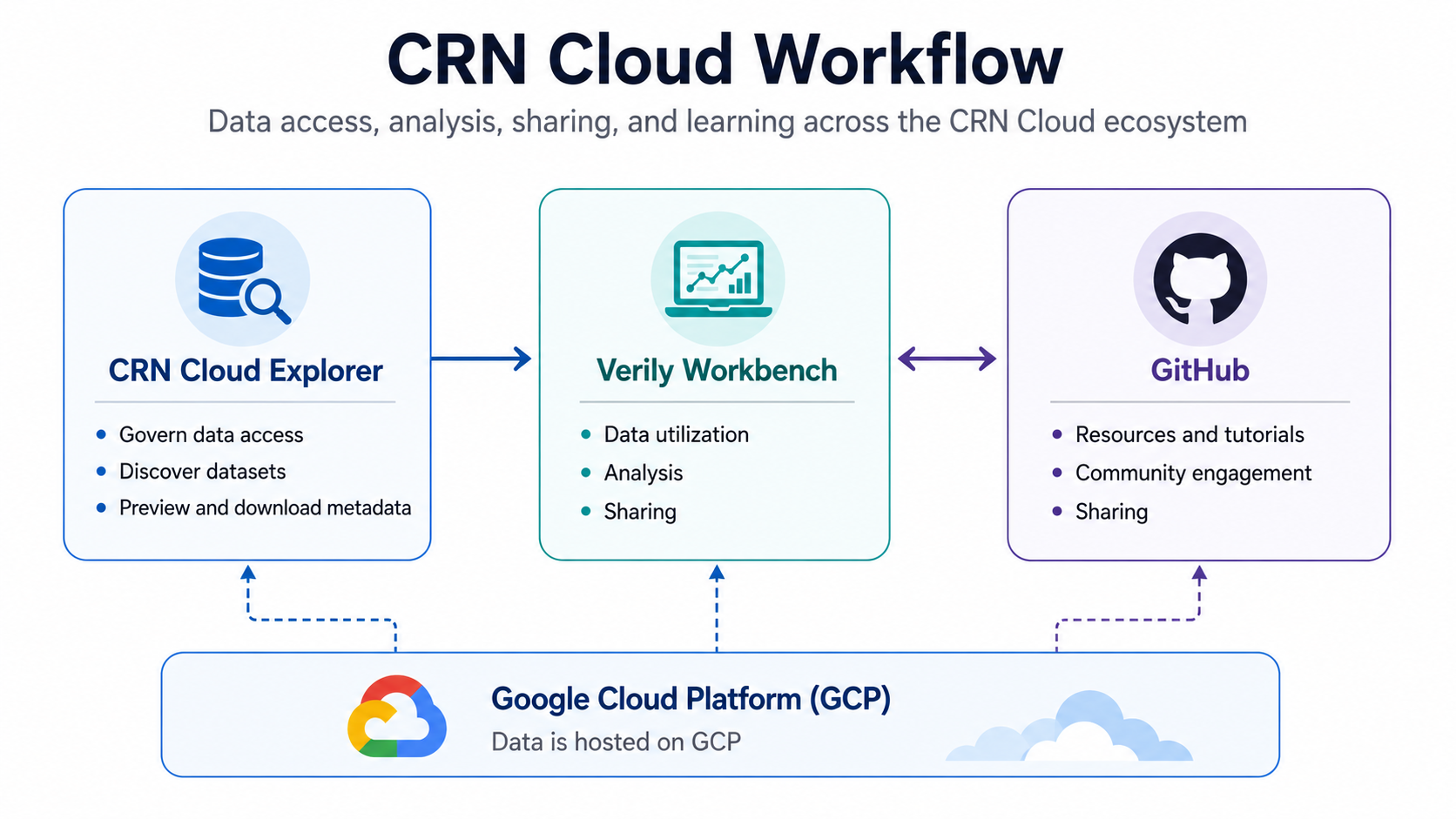
How the pieces fit together
The CRN Cloud ecosystem has three parts
New here? Read What is the CRN Cloud? for the full picture before diving in.
Where do I start?
| If you're trying to... | Go to |
|---|---|
| Understand what the CRN Cloud is and how it works | What is the CRN Cloud? |
| Get access to CRN Cloud data | Requesting Data Access |
| Browse available datasets before requesting anything | CRN Cloud Explorer |
| Set up and use your analysis environment | Verily Workbench Guide |
| Fork a repo or contribute code/docs | Contributing on GitHub |
| Understand how the scRNA-seq pipeline processes data | scRNA-seq Pipeline Guide |
| Figure out which dataset/release version you need | CRN Cloud Rosetta Stone |
| Learn by doing — notebooks, workshops, and videos | Tutorials & Case Studies |
| Something's broken, or you have a quick question | Troubleshooting & FAQs |
| A term (pod, workspace, collection...) isn't clicking | Glossary |
New to all of this?
Follow the Getting Started section in order — it's built as a straight path from "what is this platform" to "I have data loaded in a notebook." Everything else on this site is reference material you can come back to as needed.
About this Learning Lab
This site is maintained by the CRN Cloud Team and grows as the platform does. If you find a gap, a broken link, or something that could be clearer, contributions are welcome — see Contributing on GitHub for how to open a pull request.