Working with GitHub
This page covers how to get your own copy of the ASAP-CRN Learning Lab, decide between forking and reusing it, and contribute improvements back to the shared resources.
Step 1: Get the Learning Lab Repository
There are two recommended ways to use the Learning Lab, depending on how much customization you need.
Option A: Fork the repository on GitHub (recommended)
Forking creates your team's own copy of the repository so you can customize notebooks, documentation, and workflows while keeping the upstream Learning Lab intact.
- Go to the Learning Lab repo on GitHub: https://github.com/ASAP-CRN/asap-crn-learning-lab
-
Click Fork (top right).
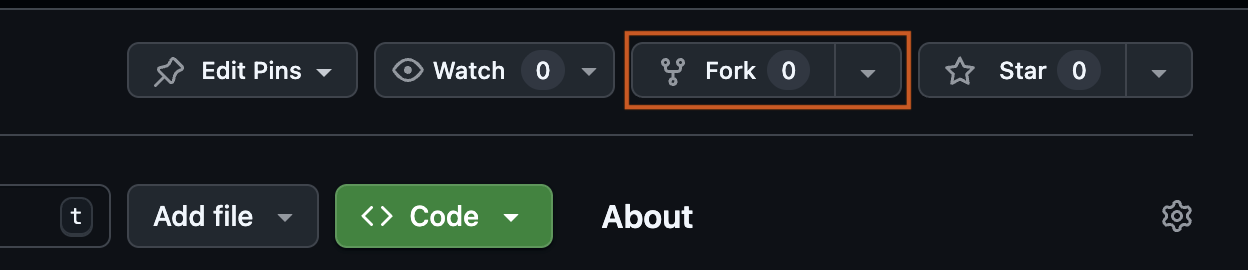
-
Choose your organization or personal account as Owner of the forked repo.
- Click Create fork.
Note
For more on forking a repository, see the official GitHub documentation on forking.
✅ Best for: teams that plan to modify notebooks, add new content, or maintain internal variants of the Learning Lab.
Option B: Reuse without forking (minimal changes)
If you only want to run or reference the Learning Lab without saving changes back to GitHub, you can use the upstream repository directly — either by cloning it locally, or connecting it directly in Verily Workbench as a minimal reference.
Any edits made in the workspace will persist within the app environment but will not be reflected in the source repository on GitHub.
✅ Best for: teams that want to explore, run, or lightly modify notebooks for their own analyses without maintaining a fork or contributing changes upstream.
Step 2: Connecting your repository to Verily Workbench
Once you've decided whether to fork or reuse, the next step is linking that repository to your Workbench workspace so it's available in your analysis apps. See Connecting GitHub Repos for the full walkthrough.
Repositories added to a workspace are cloned into new apps created after the repository is linked. If you already created an app, you may need to clone the repository manually or create a new app.
Tip
If your workspace was created from the Learning Lab template, a repository may already be linked. If you plan on making changes, it's recommended to link your forked repository rather than the upstream one.
Step 3: Saving your work
If you make changes to notebooks, documentation, or code, save them with Git.
A typical workflow is:
git status
git checkout -b my-update-branch
git add .
git commit -m "Describe the change"
git push
After pushing your branch to GitHub, you can open a pull request if you want the changes reviewed and merged into the shared Learning Lab.
Use clear branch names that describe the work, such as:
fix-workbench-guide
add-spatial-tutorial
update-pipeline-docs
Step 4: Keeping your fork up to date
If you fork the Learning Lab repository, your fork may fall behind the upstream ASAP-CRN repository over time.
Before starting new work, update your fork so you are working from the latest version of the Learning Lab.
A typical workflow is:
git status
git pull
If your fork is behind the upstream repository, sync your fork on GitHub or update it from the command line before making new changes.
Keeping your fork up to date helps reduce merge conflicts and makes it easier to contribute changes back to the shared Learning Lab.
Step 5: Contributing back to the Learning Lab
We welcome contributions that improve the Learning Lab for the broader ASAP CRN community, including bug fixes, documentation updates, and new or improved notebooks.
Reporting issues
If you find a bug, unclear documentation, or have a suggestion:
- Visit the Learning Lab GitHub repository.
- Open a New Issue with a brief description and relevant context (file names, errors, screenshots).
Submitting pull requests
To share improvements:
- Fork the repository.
- Create a new branch for your changes.
- Make and test your updates.
- Push to your fork and open a Pull Request, with a short summary of what changed and why.
Note
For more on submitting a pull request from a fork, see the official GitHub documentation.
Best practices
- Keep changes focused and small.
- Follow existing structure and naming conventions.
- Update documentation when adding new content.
- Ensure notebooks and code run end-to-end.
- Do not include sensitive or private data.
If changes are highly experimental or specific to internal work, keep them in your fork rather than submitting a pull request.